Debugmode Wax: Difference between revisions
mNo edit summary |
improvements to the shatter section |
||
| Line 50: | Line 50: | ||
* '''Shatter''' - "shatters" a 3D object. One of the more versatile Wax effects, as it can be manipulated to warp shapes and create interesting 3D | * '''Shatter''' - "shatters" a 3D object. One of the more versatile Wax effects, as it can be manipulated to warp shapes and create interesting 3D shapes. | ||
There are two major "modes" to the shatter effect: "standard" and "bulge". Standard is your regular triangular shatter effect, while Bulge instead stretches the 3D shape to the shape of the bulge. | |||
Some tips and tricks for working with Shatter: | |||
* The shatter effect is animated by default. If you don't want this, set the Force variable to a non-zero value. | |||
* The "shatter" itself is an object that manipulates whatever is around it. Multiple shatters can be combined to make complicated modifications to shapes, especially if Bulge is turned on. | |||
<gallery> | |||
File:Shatter wax default.jpg|The default preset for Shatter. Keep in mind that the default is animated to "explode" over time. | |||
File:Shatter wax corner.jpg|The same effect but the the shatter moved slightly to the left. Keep in mind the two objects do ''not'' move together! | |||
File:Cube bulge.jpg|A cube object with Bulge mode enabled. | |||
File:Bulge reverse example.jpg|Setting the Force to a negative number results in shapes turning themselves inside out! | |||
File:Large polygon cube negative.jpg|Setting the Fragment Size to higher than 1.0 leads to giant triangles. | |||
</gallery> | |||
* '''Vortex''' - creates a 3D vortex out of the footage. One of Wax's most well known effects. | * '''Vortex''' - creates a 3D vortex out of the footage. One of Wax's most well known effects. | ||
Revision as of 03:08, 31 August 2025
 | This article is a stub! It is missing critical information, likely just standing ground until it is completed later. Come back soon! Reason: (none specified) |

Debugmode Wax, known usually as just Wax is a video compositor for Windows, and the oldschool tool for 3D tennis effects.[1] It was prominent from the late 2000's to the early 2010's, known for its distinct look and unique set of capabilities. It was eventually replaced in the meta by more capable editors like After Effects and Blender or by 3D plugin sets like in BCC.
Wax was notable because of its ability to be used as both a plugin and a standalone editor. If installed as a plugin, you could load it into any 32-Bit video editor (like old version of Vegas) and use it directly inside.
Usage
Wax is primitive, but has most of the features of any other NLE. Footage can be added into the "MediaPool", then dragged onto the timeline wherever you wish. Plugins and Transitions add pizzazz to your works.
Timeline Global Settings
The timeline has global settings that affect certain parts of the frame's 3D space. This is disabled by default and must be enabled by clicking the check-box next to the timecode in the timeline.
The options that can be changed here are:
- Ambient Color
- Smooth Shading (enabled by default)
- Shadows
- View Mode - How you want the scene to be viewed. By default this is "Fill", however there is also "Lines" (which renders as wireframe) and "Points" (which renders as points).

- Camera - 3D transformations for the scene camera.
Importing 3rd-party Plugins
Various video editors, such as Windows Movie Maker 2.6 can have their plugins directly imported into Wax. This can be done by adding the folders of these editors into Wax's "preferences" -> "3rd party plugin folders" menu. In the case of Windows Movie Maker, these imported effects/transitions will appear under their respective menu in the DirectX panel.
Video Plugins
Wax has a small, but powerful collection of effects (known as "video plugins". It also has a very large set of presets to work with.
Wax also has compatibility with FreeFrame and certain DirectX plugins (like older versions of NewBlue).
3D Effects
Wax's 3D effects are split into two categories - Basic and General.
Basic
- Transform 3D - allows the footage to be transformed in 3D space (transformation, scale, rotation, etc.) This effect is prerequisite for all other 3D effects and is added automatically if not present when one is added in.
- Objects 3D - converts the footage into a 3D primitive object. These include a plane (default), a cube, a sphere, a cylinder, or a torus.

- Lights 3D - adds lights to a 3D scene.
General
- Text 3D - creates text in 3D.

- Shatter - "shatters" a 3D object. One of the more versatile Wax effects, as it can be manipulated to warp shapes and create interesting 3D shapes.
There are two major "modes" to the shatter effect: "standard" and "bulge". Standard is your regular triangular shatter effect, while Bulge instead stretches the 3D shape to the shape of the bulge.
Some tips and tricks for working with Shatter:
- The shatter effect is animated by default. If you don't want this, set the Force variable to a non-zero value.
- The "shatter" itself is an object that manipulates whatever is around it. Multiple shatters can be combined to make complicated modifications to shapes, especially if Bulge is turned on.
-
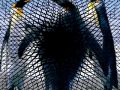 The default preset for Shatter. Keep in mind that the default is animated to "explode" over time.
 -
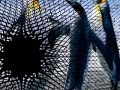 The same effect but the the shatter moved slightly to the left. Keep in mind the two objects do not move together!
 -
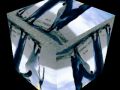 A cube object with Bulge mode enabled.
 -
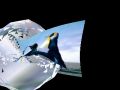 Setting the Force to a negative number results in shapes turning themselves inside out!
 -
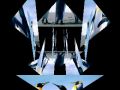 Setting the Fragment Size to higher than 1.0 leads to giant triangles.


- Vortex - creates a 3D vortex out of the footage. One of Wax's most well known effects.

- Particles - "Creates natural effects using a group of particles to simulate fire, water, smoke etc."

- Model Loader - "Loads 3D models and objects from external files." Supports .3DS, .MD2 (The model format for Quake II) and .MS3d (MilkShake 3D)[2] models.
2D Effects
Wax's 2D effects are split into two categories - General and Color.
General
- Texture Generator - A media generation tool based on Noise functions that optionally can be overlaid over the source footage. Can also be used to tile the footage, based on the top left corner.
-
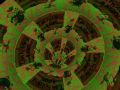 An example texture generation, being tiled over the source image.
 -
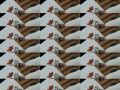 Texture Generator's tiling capabilities. Notice how it replicates from the top right rather than cloning the whole image.


- Quick 3D - "Create a quick 3D view of a video. This is not a 3D plugin so cannot be used with other 3D plugins."
- PixelStretch - "stretches" pixels in any direction. Similar in effect to the "slide" tiling pattern in CC RepeTile or the "cropping" parameter of NewBlue Wiggle.

- RotoMate - "Provides tools to rotoscope/paint on the video with shapes, masks, keyframes and more."
- Warp (WinMorph) - a plugin that lets you hook into WinMorph to use its warping functionality directly from Wax. "Warps the image/video using control shapes drawn by the user."
- Shatter Image - "Shatters images/videos into pieces. This is not a 3d plugin so cannot be used with other 3d plugins."
Color
- Chroma Key - "Makes a portion of a video transparent based on the selected color so tracks below the keyed video show through in the composited (mixed) output."