
Digital Distortion: Difference between revisions
document simple3d bar corruption |
|||
| (One intermediate revision by the same user not shown) | |||
| Line 10: | Line 10: | ||
==== [[Databending]] ==== | ==== [[Databending]] ==== | ||
=== Settings-related === | === Settings-related === | ||
How a video is rendered (or initial settings) can lead to distortions in itself, if done right. | How a video is rendered (or initial settings) can lead to distortions in itself, if done right. Examples include lowering the resolution, bitrate, and other settings. A lot of these also come as side effect of re-rendering works to be compatible for older machines. <ref>https://web.archive.org/web/20230627160128if_/https://www.razorback95.com/guides/encode-movies-for-old-computers</ref> | ||
==== Low bitrate ==== | ==== Low bitrate ==== | ||
| Line 46: | Line 46: | ||
</Effects> | </Effects> | ||
</TransitionsAndEffects></nowiki> | </TransitionsAndEffects></nowiki> | ||
====Windows Movie Maker DxtKey Glitch==== | |||
Another type of distortion in WMM involves the DxtKey (or "Key Transition" <ref>https://learn.microsoft.com/en-us/windows/win32/directshow/key-transition</ref>) feature in DirectShow. If invalid values are given for the "similarity" field, the filter will once again fail spectacularly. An example found by {{mrdoognoog}} can be seen below. | |||
<nowiki><TransitionsAndEffects Version="1.0"> | |||
<Transitions> | |||
<TransitionDLL guid="{C5B19592-145E-11D3-9F04-006008039E37}"> | |||
<Transition name="Databend Key" iconid="88"> | |||
<Param name="KeyType" value="0" /> | |||
<Param name="Similarity" value="60" /> | |||
<Param name="RGB" value="0xB4B4B4" /> | |||
</Transition> | |||
</TransitionDLL> | |||
</Transitions> | |||
</TransitionsAndEffects></nowiki> | |||
Latest revision as of 02:35, 25 June 2025
 | This article is a stub! It is missing critical information, likely just standing ground until it is completed later. Come back soon! Reason: (none specified) |
Digital Distortion, much like Analog Distortion, is a general category of distortion techniques that take place outside of a video editor- all generally involving distortions relating to the video file itself, through resolution, settings, or data corruption - Sometimes, this is informally referred to as 'crust'-ing a video.
Techniques
Datamoshing
Corruption
Databending
How a video is rendered (or initial settings) can lead to distortions in itself, if done right. Examples include lowering the resolution, bitrate, and other settings. A lot of these also come as side effect of re-rendering works to be compatible for older machines. [1]
Low bitrate
Rendering with an intentionally low video and/or audio quality can add a certain charm to a video that is hard to get otherwise; in some cases it can provide a much more "retro tennis" look, on others it can smooth out rougher edits as your brain fills in what may not be entirely clear.
Interlacing
Many older codecs (especially AVIs) will interlace by default. This means that the video will appear to split apart into small bars whenever there is fast movement.
Miscellaneous
Windows Movie Maker Simple3D Bar Glitch
In Windows Movie Maker Versions 2.X, it is possible to create basic 3D effects using the "Simple3D" module. However on some newer machines, layering two videos on top of each other (to form a transition) while both have an effect using "Simple3D" will cause it to break spectacularly; the top layer will phase in and out of existence as a series of random horizontal bars. The default "Fade" or any static (ex. Chromakey) transition work best, however others should work as well.
-
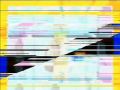 The Simple3D Bar Glitch in action, captured directly from the WMM preview pane.
 -
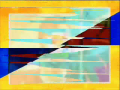 The same glitch, however after rendering as a WMV file. Notice how the bars curve into points - keep this in mind on how you wish to save your file.


Below is a basic plugin preset that does not rely on any other plugins to be installed. On the surface it does absolutely nothing; however it loads the Simple3D module that lets the glitch happen (without any 3D transformations getting in the way).
 <TransitionsAndEffects Version="1.0">
 <Effects>
 <EffectDLL guid="{B4DC8DD9-2CC1-4081-9B2B-20D7030234EF}">
 <Effect name="00 Simple3D Bar Glitch" iconid="33" >
 <Param name="InternalName" value="Simple3D" />
 <Param name="ScaleA" value="1.0" />
 <Param name="InitialScaleA" value="1.0" />
 <Param name="RotateA" value="right" />
 <Param name="ExponentialProgressDuration" value="1.0" />
 <Param name="ExponentialProgressScale" value="0.01" />
 <Param name="Progress" value="0.01" />
 </Effect>
 </EffectDLL>
 </Effects>
 </TransitionsAndEffects>
Windows Movie Maker DxtKey Glitch
Another type of distortion in WMM involves the DxtKey (or "Key Transition" [2]) feature in DirectShow. If invalid values are given for the "similarity" field, the filter will once again fail spectacularly. An example found by mrdoognoog can be seen below.
<TransitionsAndEffects Version="1.0">
<Transitions>
<TransitionDLL guid="{C5B19592-145E-11D3-9F04-006008039E37}">
<Transition name="Databend Key" iconid="88">
<Param name="KeyType" value="0" />
<Param name="Similarity" value="60" />
<Param name="RGB" value="0xB4B4B4" />
</Transition>
</TransitionDLL>
</Transitions>
</TransitionsAndEffects>