Generated Media: Difference between revisions
Created page with "Category:Techniques '''Generated Media''' is media that is... generated by a program. This can be anything from solid colors to grids to advanced 3D fractal patterns. But what is important is that this is ''media'' that then can be used elsewhere. =Usage= Simply generate the media in your program of choice, then add it to your video. Most editors (like Vegas and Premiere) have ways to generate simple media in-house. =Types of Generated Media= ==Solid Color..." |
more text |
||
| (5 intermediate revisions by 2 users not shown) | |||
| Line 1: | Line 1: | ||
[[Category:Techniques]] | [[Category:Techniques]] | ||
'''Generated Media''' | '''Generated Media''' are any piece of footage that is ''created by a program'' (usually one's video editor of choice), rather than pre-existing footage that was imported into the program. Examples of generated media include anything from solid colors to grids to advanced 3D fractal patterns. | ||
=Usage= | =Usage= | ||
Simply generate the media in your program of choice, then add it to your video. Most editors (like [[Vegas]] and [[Premiere]]) have ways to generate simple media in-house. | Simply generate the media in your program of choice, then add it to your video. Most editors (like [[Vegas]] and [[Premiere]]) have ways to generate simple media in-house. Other programs such as [[Visions of Chaos]] are intended purpose is to ''create'' generated media. | ||
=Types of Generated Media= | =Types of Generated Media= | ||
==Solid Colors== | ==Solid Colors== | ||
As simple as it sounds | <small>"Red, Yellow, Green, Red, Blue, Blue, Blue..." - Ludwig Von Drake</small> | ||
As simple as it sounds; a single color. | |||
==Grids== | ==Grids== | ||
A | A collection of evenly spaced shapes, usually squares, separated by a border. | ||
==Checkerboards== | ==Checkerboards== | ||
Checkerboard | [[File:Checkerboard.jpg]] | ||
Patterns of alternating colors, usually squares and offset per row. | |||
==Gradients== | ==Gradients== | ||
A smooth transition from one or more colors to another. Can either be linear (in a straight line) or radial (in a circular pattern). | A smooth transition from one or more colors to another. Can either be linear (in a straight line) or radial (in a circular pattern). | ||
<gallery> | |||
File:Linear gradient.jpg|An example of a linear gradient. | |||
File:Radial gradient.jpg|An example of a radial gradient. | |||
File:Vegas desert gradient.jpg|Gradients can be combined to make complicated patterns. Shown here is the infamous "desert" preset present in [[Vegas]]. | |||
</gallery> | |||
==Static== | ==Static== | ||
See [[Noise]]. | Static can mean a wide variety of things, but often means black and white patterns of random pixels that change with every frame (like an analog TV with no signal.) See [[Noise]] for more. | ||
==Test Patterns== | ==Test Patterns== | ||
Many editors can create TV test patterns. | [[File:Smpte bars ntsc.jpg]] | ||
Many editors can create TV test patterns based on various local standards, such as the SMPTE color bars seen above. | |||
=Standalone Programs= | =Standalone Programs= | ||
* [[IBNIZ]] | * [[IBNIZ]] - A programming language environment made to create incredibly small visual-audio demos and other art. | ||
* [[Visions of Chaos]] | * [[Visions of Chaos]] - A tool primarily made to generate fractals, but can also create [[AI]]-generated images and many other things. | ||
* [[Cathodemer]] | * [[Cathodemer]] - A tool made to create analog-looking patterns. | ||
* [[Processing]] - A programming language based on Java designed for artists to create visually interesting programs.<ref>https://processing.org/</ref> | |||
=Sources= | |||
Latest revision as of 02:44, 31 August 2025
Generated Media are any piece of footage that is created by a program (usually one's video editor of choice), rather than pre-existing footage that was imported into the program. Examples of generated media include anything from solid colors to grids to advanced 3D fractal patterns.
Usage
Simply generate the media in your program of choice, then add it to your video. Most editors (like Vegas and Premiere) have ways to generate simple media in-house. Other programs such as Visions of Chaos are intended purpose is to create generated media.
Types of Generated Media
Solid Colors
"Red, Yellow, Green, Red, Blue, Blue, Blue..." - Ludwig Von Drake
As simple as it sounds; a single color.
Grids
A collection of evenly spaced shapes, usually squares, separated by a border.
Checkerboards

Patterns of alternating colors, usually squares and offset per row.
Gradients
A smooth transition from one or more colors to another. Can either be linear (in a straight line) or radial (in a circular pattern).
-
 An example of a linear gradient.
 -
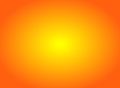 An example of a radial gradient.
 -
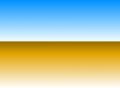 Gradients can be combined to make complicated patterns. Shown here is the infamous "desert" preset present in Vegas.


Static
Static can mean a wide variety of things, but often means black and white patterns of random pixels that change with every frame (like an analog TV with no signal.) See Noise for more.
Test Patterns

Many editors can create TV test patterns based on various local standards, such as the SMPTE color bars seen above.
Standalone Programs
- IBNIZ - A programming language environment made to create incredibly small visual-audio demos and other art.
- Visions of Chaos - A tool primarily made to generate fractals, but can also create AI-generated images and many other things.
- Cathodemer - A tool made to create analog-looking patterns.
- Processing - A programming language based on Java designed for artists to create visually interesting programs.[1]