
Windows Movie Maker: Difference between revisions
info about the betas (windows media pad, 3.0) |
m add nav |
||
| (3 intermediate revisions by the same user not shown) | |||
| Line 1: | Line 1: | ||
[[Category:Video Editors]] | [[Category:Video Editors]] | ||
[[File:Wmm article splash.jpg|320px]] | |||
[[File:WMM 6 logo.png|thumb|right|The logo for Windows Movie Maker 6.0.]] | |||
'''Windows Movie Maker''' (also known as '''WMM''') is a non-linear video editor (NLE) by [[Microsoft]] for Windows computers. While it used to come prepackaged (or as an add-on) with versions spanning Windows ME to Windows 8, as of January 2017 it has been deprecated and no longer updated or bundled with modern machines. | |||
In modern times | WMM is free and very easy to use compared to more sophisticated editors, making it very popular in the early days of [[tennis]]. In modern times however WMM has largely fallen on the wayside to modern editors like [[Vegas]] as it becomes increasingly unstable on modern machines. Despite this, it has been seeing a resurgence by persistent players who want to see a return to more "classic" style of play that involves doing more with less and caring less about "showing off" with impressive visuals. | ||
There was one major [[tournament]] that limited players only to WMM, the [[Windows Movie Maker Master]] tournament (WMMM). | There was one major [[tournament]] that limited players only to WMM, the [[Windows Movie Maker Master]] tournament (WMMM), won by {{DaftPunkYoshi}}. | ||
=Usage= | =Usage= | ||
==General Usage== | ==General Usage== | ||
In 2.X to 6.0, the "Collections" pane lets you gather source material which can then be added to the timeline. This persists across project files, so sources will remain in WMM forever until you delete them manually. You can also create nested folders to further sort this material. | |||
Videos are then dragged from the collections pane / directly imported into the timeline. The timeline is very limited, only having one video layer to work with. There are also extra layers for music and a title overlay. Videos can also be transitioned between in a variety of ways. | |||
==Building Custom Profiles== | ==Building Custom Profiles== | ||
| Line 21: | Line 24: | ||
=Versions= | =Versions= | ||
==Windows Media Pad== | ==Windows Media Pad (beta)== | ||
The earliest known version of Windows Movie Maker, then known as '''Windows Media Pad''', was found on an early build (2416) of Windows ME. This version is drastically different than 1.0, with a unique layout that is not seen elsewhere. More information can be found [https://betawiki.net/wiki/Windows%20Me%20build%202416 here]. | The earliest known version of Windows Movie Maker, then known as '''Windows Media Pad''', was found on an early build (2416) of Windows ME. This version is drastically different than 1.0, with a unique layout that is not seen elsewhere. More information can be found [https://betawiki.net/wiki/Windows%20Me%20build%202416 here]. <ref>https://betawiki.net/wiki/Windows%20Me%20build%202416</ref> | ||
==WMM 1.0== | ==WMM 1.0== | ||
| Line 37: | Line 40: | ||
[[File:WMM26.png|thumb|right|A screenshot of Windows Movie Maker 2.6.]] | [[File:WMM26.png|thumb|right|A screenshot of Windows Movie Maker 2.6.]] | ||
==WMM 3.0== | ==WMM 3.0 (Beta)== | ||
Another unreleased beta version of Windows Movie Maker, found on Windows Longhorn (Vista beta) build 4093. Another completely unique build with its own "Avalon" styled layout; it did not get very far in development and is almost unusable. More info can be found [https://betawiki.net/wiki/Windows%20Longhorn%20build%204093%20(main) here]. | Another unreleased beta version of Windows Movie Maker, found on Windows Longhorn (Vista beta) build 4093. Another completely unique build with its own "Avalon" styled layout; it did not get very far in development and is almost unusable. More info can be found [https://betawiki.net/wiki/Windows%20Longhorn%20build%204093%20(main) here].<ref>https://betawiki.net/wiki/Windows%20Longhorn%20build%204093%20(main)</ref> | ||
==WMM 6.0== | ==WMM 6.0== | ||
| Line 60: | Line 63: | ||
2.X and 6.0 use the MSWMM format. They can be read between versions (for the most part), as well as converted to work in WLMM. | 2.X and 6.0 use the MSWMM format. They can be read between versions (for the most part), as well as converted to work in WLMM. | ||
The contents of these files cannot be read by a text editor, they are in the Microsoft Compound Document File Format for OLE Structured Storage (MCDF). A program like [https://github.com/ironfede/openmcdf OpenMCDF] can be used to view and modify these files; however they contain a checksum which needs to be updated to view the file as valid | The contents of these files cannot be read by a text editor, they are in the Microsoft Compound Document File Format for OLE Structured Storage (MCDF). A program like [https://github.com/ironfede/openmcdf OpenMCDF]<ref>https://github.com/ironfede/openmcdf</ref> can be used to view and modify these files; however they contain a checksum which needs to be updated to view the file as valid. | ||
WLMM uses the WLMP file format. This is in raw XML which can be easily viewed by the end user. | WLMM uses the WLMP file format. This is in raw XML which can be easily viewed by the end user. | ||
| Line 67: | Line 70: | ||
The effects and transitions of each version of WMM vary wildly, due to changes in architecture between versions. | The effects and transitions of each version of WMM vary wildly, due to changes in architecture between versions. | ||
==Effects== | ==Effects== | ||
<gallery> | |||
Wmm26 effects.png|The full list of WMM 2.6 effects. | |||
Wmm6 effects.png|The full list of WMM 6.0 effects. | |||
Wlmm effects.png|The full list of WLMM effects. | |||
</gallery> | |||
{| class="wikitable sortable" | {| class="wikitable sortable" | ||
| Line 254: | Line 257: | ||
==Building Presets== | ==Building Presets== | ||
===Effects=== | ===Effects=== | ||
The basic XML skeleton for an effect looks like this: | ====In 2.6==== | ||
The basic XML skeleton for an effect in 2.6 looks like this: | |||
<nowiki><TransitionsAndEffects Version="1.0"> | |||
<Effects> | |||
<EffectDLL guid="{B4DC8DD9-2CC1-4081-9B2B-20D7030234EF}"> | |||
<Effect name="@Rotate Perspective-60% size" iconid="33" | |||
comment="Ease In"> | |||
<Param name="InternalName" value="Simple3D" /> | |||
<Param name="ScaleA" value="0.6" /> | |||
<Param name="InitialScaleA" value="0.6" /> | |||
<Param name="ExponentialProgressDuration" value="0.01" /> | |||
<Param name="RevolveCamera" value="true" /> | |||
<Param name="ShowABack" value="true" /> | |||
<Param name="progress" value="0.84" /> | |||
</Effect> | |||
</EffectDLL> | |||
</Effects> | |||
</TransitionsAndEffects></nowiki> | |||
Keep in mind that comments are not valid! They ''are'' valid in 6.0, however. | |||
====In 6.0==== | |||
The basic XML skeleton for an effect in 6.0 looks like this: | |||
<nowiki><TransitionsAndEffects Version="2.8"> | <nowiki><TransitionsAndEffects Version="2.8"> | ||
<Effects> | <Effects> | ||
| Line 274: | Line 299: | ||
This effect will pan your footage to the top left of the screen. It uses the built-in "parity.fx" library. | This effect will pan your footage to the top left of the screen. It uses the built-in "parity.fx" library. | ||
===Transitions=== | ===Transitions=== | ||
The basic XML skeleton for an transition looks like this: | ====In 6.0==== | ||
The basic XML skeleton for an transition in 6.0 looks like this: | |||
<nowiki><TransitionsAndEffects Version="2.8" specialiconfileid="5669" specialiconresourceid="101"> | <nowiki><TransitionsAndEffects Version="2.8" specialiconfileid="5669" specialiconresourceid="101"> | ||
<Transitions> | <Transitions> | ||
| Line 289: | Line 315: | ||
This effect is part of the "DPL 2x2" library, which uses [[ShaderTFX]] as a base. It places the before and after footage side by side, on the bottom of the screen. | This effect is part of the "DPL 2x2" library, which uses [[ShaderTFX]] as a base. It places the before and after footage side by side, on the bottom of the screen. | ||
{{VideoEditors}} | |||
=Resources= | |||
* The FX Archive was the go-to resource for working with WMM, especially for building and sharing custom presets, plugins, etc. It shut down in mid-2018, with its most recent archive available [http://web.archive.org/web/20180420225613/http://www.thefxarchive.com:80/ here.] <ref>http://web.archive.org/web/20180420225613/http://www.thefxarchive.com:80/</ref> | |||
* [https://movies.blainesville.com/ Blaine's Movie Maker Blog] contains many articles about WMM, as well as countless custom plugins for 2.X and 6.X versions. <ref>https://movies.blainesville.com/</ref> | |||
=Sources= | |||
Latest revision as of 21:03, 8 February 2026


Windows Movie Maker (also known as WMM) is a non-linear video editor (NLE) by Microsoft for Windows computers. While it used to come prepackaged (or as an add-on) with versions spanning Windows ME to Windows 8, as of January 2017 it has been deprecated and no longer updated or bundled with modern machines.
WMM is free and very easy to use compared to more sophisticated editors, making it very popular in the early days of tennis. In modern times however WMM has largely fallen on the wayside to modern editors like Vegas as it becomes increasingly unstable on modern machines. Despite this, it has been seeing a resurgence by persistent players who want to see a return to more "classic" style of play that involves doing more with less and caring less about "showing off" with impressive visuals.
There was one major tournament that limited players only to WMM, the Windows Movie Maker Master tournament (WMMM), won by DaftPunkYoshi.
Usage
General Usage
In 2.X to 6.0, the "Collections" pane lets you gather source material which can then be added to the timeline. This persists across project files, so sources will remain in WMM forever until you delete them manually. You can also create nested folders to further sort this material.
Videos are then dragged from the collections pane / directly imported into the timeline. The timeline is very limited, only having one video layer to work with. There are also extra layers for music and a title overlay. Videos can also be transitioned between in a variety of ways.
Building Custom Profiles
If you have Windows Media Encoder installed on an OS that supports it, on the "Windows Media Profile Editor" page you can set the resolution and bitrate you want. For example, 1440x1080 / 20Mbps (the bit rate cannot be higher than 20.000) and save it as a profile for WMM XP.
Versions
Windows Media Pad (beta)
The earliest known version of Windows Movie Maker, then known as Windows Media Pad, was found on an early build (2416) of Windows ME. This version is drastically different than 1.0, with a unique layout that is not seen elsewhere. More information can be found here. [1]
WMM 1.0
The first version of WMM, built in with Windows ME. It could only render in Microsoft's Advanced Systems Format (ASF) file format (equivalent to WMV or WMA).
WMM 2.1
This version of Movie Maker was bundled with Windows XP. It is the only version to support 3D transformations.

WMM 2.6
This version of WMM served as an upgrade of 2.1 for newer hardware (up to Windows 7).

WMM 3.0 (Beta)
Another unreleased beta version of Windows Movie Maker, found on Windows Longhorn (Vista beta) build 4093. Another completely unique build with its own "Avalon" styled layout; it did not get very far in development and is almost unusable. More info can be found here.[2]
WMM 6.0
The version of WMM bundled for Windows Vista (named after Vista's NT version, 6.0. Being the first major revamp of the software, many things changed in terms of functionality. 3D plugins were no longer possible (pseudo-3D still worked). Time stretching maintained the audio pitch (compared to all other versions, where it did not). This is handy as you can use it to pitch shift without changing video speed.
The "6.0" represents Vista's NT version, 6.0.

Windows Live Movie Maker (WLMM)
This version of WMM was bundled with Windows Live, a plugin package released for Windows 7. This was the second major redesign of the software, and the only version to have MP4 support, along with a way to upload directly to popular streaming sites (now no longer functional). However it was also simplified quite a bit, removing almost all plugin support. Two versions of WLMM exist, one from 2009, as well as another from 2012 with minor improvements.

Modern Versions
WMM no longer exists in its former state. Around the time of Windows 8/10, it was replaced with a "Movie Maker" app, which eventually merged into the "Photos" app. Despite the names being similar, they are generally considered different programs due to it being a complete re-write. There's also ClipChamp which is in a similar tier but costs money.
File Formats
Each major release of WMM uses a different file format for project files. 2.X and 6.0 use the MSWMM format. They can be read between versions (for the most part), as well as converted to work in WLMM.
The contents of these files cannot be read by a text editor, they are in the Microsoft Compound Document File Format for OLE Structured Storage (MCDF). A program like OpenMCDF[3] can be used to view and modify these files; however they contain a checksum which needs to be updated to view the file as valid.
WLMM uses the WLMP file format. This is in raw XML which can be easily viewed by the end user.
Effects and Transitions
The effects and transitions of each version of WMM vary wildly, due to changes in architecture between versions.
Effects
-
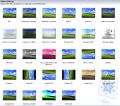 The full list of WMM 2.6 effects.
 -
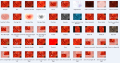 The full list of WMM 6.0 effects.
 -
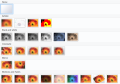 The full list of WLMM effects.


| Effect | Description/Presets | Image | History |
|---|---|---|---|
| 3D Ripple | 6.0, WLMM | ||
| Blur | 2.6, 6.0, WLMM | ||
| Brightness, Increase/Decrease | 2.6, 6.0 | ||
| Ease | In/Out | 2.6, 6.0 | |
| Edge Detection | 6.0, WLMM | ||
| Fade | from/to Black/White | 2.6, 6.0, WLMM | |
| Film Age | Presets: Old/Older/Oldest | 2.6, 6.0 | |
| Film Grain | 2.6, 6.0 | ||
| Grayscale/Black and White | Four presets in WLMM: * Default * Orange * Red * Yellow |
2.6, 6.0, WLMM | |
| Hue, Cycles Entire Color Spectrum | 2.6, 6.0, WLMM | ||
| Mirror | Horizontal/Vertical More in line with a horizontal/vertical flip |
2.6, 6.0 | |
| Pan | * Down and Zoom Out * Left to Right * Upper Left to Upper Right * Upper Right to Upper Left |
6.0 | |
| Pixelate | Video transitions from normal to heavily pixelated | 2.6, 6.0, WLMM | |
| Posterize | 2.6, 6.0, WLMM | ||
| Rotate | 90/180/270 degrees | 2.6, 6.0 | |
| Sepia Tone | 2.6, 6.0, WLMM | ||
| Sharpen | 6.0 | ||
| Slow Down, Half | 2.6, 6.0 | ||
| Speed Up, Double | 2.6, 6.0 | ||
| Spin 360 | 6.0, WLMM | ||
| Threshold | 2.6, 6.0, WLMM | ||
| Warp | 6.0, WLMM | ||
| Watercolor | 2.6, 6.0 | ||
| Zoom | * In/Out, Upper/Lower Left/Right * Focus Upper/Lower Left/Right |
6.0 | |
| Cyan Tone | WLMM | ||
| Cinematic | Default, overlay left/right 1/2 | WLMM | |
| Smudge Stick | 2.6 |
Transitions
Plug-Ins
While most commercial plug-ins do not work/ have versions for WMM, there are many custom plugins unique to WMM that exist, along with a select few professional plugin sets that work with WMM.
All versions of WMM store their plugins in their respective folder \Shared\AddOnTFX.
2.6
- Microsoft Plus! Digital Media Edition - Plus! Effects and Transitions for Windows Movie Maker 2

All of these plugins were developed by Pixelan.
6.0
- Rehan ShaderTFX - a commercial plug-in building library, allowing for much more sophisticated plugin creation.
- Pixelan SpiceFX
WLMM
Building Custom Effects/Transitions
6.0 and Older
Plugins in WMM are built in two parts:
- The shader file (*.fx) which does the actual effect work
- The preset file (*.xml) which sets parameters and loads them into WMM
- Certain more advanced filters may also have DLL files as well.
All custom effects can be found in the WMM directory's Shared/AddOnTFX folder.
WLMM
Windows Live Movie Maker uses .WLMX for effect/transition templates and .WLMS for title/credit templates.
As there is no research for how WLMX files work, every custom effect/plugin for it is made by modifying pre-existing WLMX files.
WLMM effects can be found in C:\Program Files (x86)\Windows Live\Photo Gallery\MovieMakerTemplates
Building Shaders
WMM shaders use DirectX 9.0 (for WMM6). They are programmed in HLSL (High Level Shader Language), which is similar syntax to C.
Building Presets
Effects
In 2.6
The basic XML skeleton for an effect in 2.6 looks like this:
<TransitionsAndEffects Version="1.0">
<Effects>
<EffectDLL guid="{B4DC8DD9-2CC1-4081-9B2B-20D7030234EF}">
<Effect name="@Rotate Perspective-60% size" iconid="33"
comment="Ease In">
<Param name="InternalName" value="Simple3D" />
<Param name="ScaleA" value="0.6" />
<Param name="InitialScaleA" value="0.6" />
<Param name="ExponentialProgressDuration" value="0.01" />
<Param name="RevolveCamera" value="true" />
<Param name="ShowABack" value="true" />
<Param name="progress" value="0.84" />
</Effect>
</EffectDLL>
</Effects>
</TransitionsAndEffects>
Keep in mind that comments are not valid! They are valid in 6.0, however.
In 6.0
The basic XML skeleton for an effect in 6.0 looks like this:
<TransitionsAndEffects Version="2.8">
    <Effects>
        <EffectDLL guid="TFX">
            <Effect name="00 Pan Top Left" iconid="0" guid="00 Pan Top Left" shadermodel="2">
                <Param name="Animation" value="FXPanZoom" />
                <Param name="FXFile" value="Parity.fx" />
                <Param name="Technique" value="PanZoom" />
                <Semantics>
                    <TextureViewport evaluation="Linear" type="float4">
                        <Point time="0.0" value="0.0,0.0,2.0,2.0"/>
                    </TextureViewport>
                </Semantics>
            </Effect>
        </EffectDLL>
    </Effects>
</TransitionsAndEffects>
This effect will pan your footage to the top left of the screen. It uses the built-in "parity.fx" library.
Transitions
In 6.0
The basic XML skeleton for an transition in 6.0 looks like this:
<TransitionsAndEffects Version="2.8" specialiconfileid="5669" specialiconresourceid="101">
     <Transitions>
	<TransitionDLL guid="ShaderTFX.ShaderTransition">
		<Transition name="DPL 2x2 LL-LR " iconid="2" guid="DPL 2x2 LL-LR" ShaderModel="2">
			<ShaderFilename value="DPL 2x2 TX.fx"/>
			<Technique value="DPL2x2T"/>
			<Semantics>
				<RectAOut type="float4" value="0.0, 0.5, 0.5, 0.5"   />
				<RectBOut type="float4" value="0.5, 0.5, 0.5, 0.5"   />
			</Semantics>
	  	</Transition>
</TransitionsAndEffects>
This effect is part of the "DPL 2x2" library, which uses ShaderTFX as a base. It places the before and after footage side by side, on the bottom of the screen.
Resources
- The FX Archive was the go-to resource for working with WMM, especially for building and sharing custom presets, plugins, etc. It shut down in mid-2018, with its most recent archive available here. [4]
- Blaine's Movie Maker Blog contains many articles about WMM, as well as countless custom plugins for 2.X and 6.X versions. [5]